
Exploring Table Formats - Iceberg & SlateDB

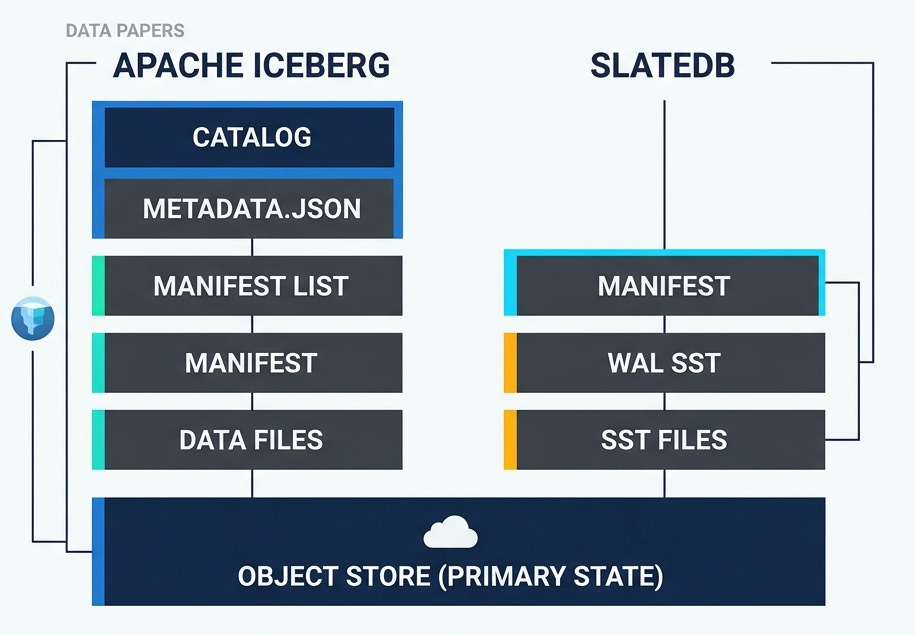
Open table formats like Apache Iceberg, Apache Hudi and Delta define the rules for organizing set of files in parquet or other formats as efficient analytical tables. SlateDB is an embedded key-value store built on object store. These systems have a lot in common, they are all about using object store as the primary or the only state. This post would dive deep into Apache Iceberg and SlateDB’s spec for the following scenarios and describe about how the files are represented on object store.
Basic Table creation
Appending data to the table.
Update: Modifying existing data.
Maintenance operations: Compaction, garbage collection.
Clones and Branches : Forking the table.
Note: The post was written using TableFormatsExplorer, a repo that makes exploring table formats like iceberg easy by explaining the metadata files created. You can use that to ask additional questions on these formats!
Basic Table creation and Appends
Lets use a running example for all the sections. We would create the following table and add one row to it.
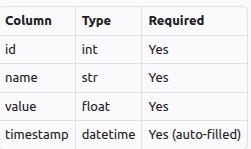
Here is how the table would be represented in various formats. Note: Metadata files are edited, to only keep the fields that are relevant to the specific concept being discussed.
Apache Iceberg
Metadata.json is the entry point for table metadata in Iceberg. Here is how it would look after the table was created. A new metadata.json file would be created for every change to the table.
{
    "location": "demo_outputs/custom/iceberg/default/users",
    "table-uuid": "e8715bb8-2bdd-4447-8591-6666202feb53",
    "last-updated-ms": 1775410195077,
    "last-column-id": 4,
    "schemas": [
        {
            "type": "struct",
            "fields": [
                {
                    "id": 1,
                    "name": "id",
                    "type": "int",
                    "required": true
                },
                {
                    "id": 2,
                    "name": "name",
                    "type": "string",
                    "required": true
                },
                {
                    "id": 3,
                    "name": "value",
                    "type": "double",
                    "required": true
                },
                {
                    "id": 4,
                    "name": "timestamp",
                    "type": "timestamp",
                    "required": true
                }
            ],
            "schema-id": 0,
            "identifier-field-ids": []
        }
    ],
    "current-schema-id": 0,
    "default-spec-id": 0,
    "snapshots": [],
    "snapshot-log": [],
    "metadata-log": [],
    "refs": {},
    "format-version": 2,
    "last-sequence-number": 0
}Schemas: Lists the schemas that this table evolved through, there is only one for this table.current-schema-idis the schema active as of this file.Location: Namespace and table name.Table-uuid:Unique identifier for the table, that stays stable.Format-version: Table format version for this table is 2.
Iceberg also needs a catalog. Catalog stores the current metadata.json file for every table. Here is how the catalog would look for the example table. metadata_location would be updated on every update to the table.
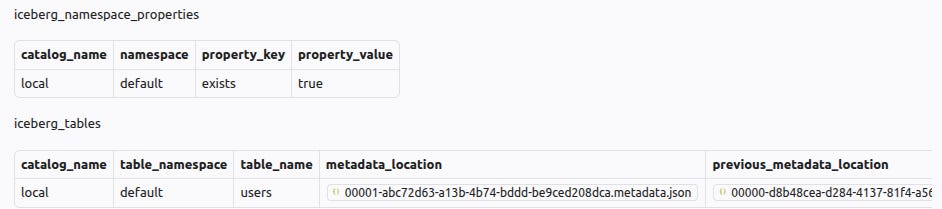
Apache Iceberg spec describes the format in more detail. Now lets add 1 row to this table. Here is what changes.
There is a new metadata.json
{
    "location": "demo_outputs/custom/iceberg/default/users",
    "table-uuid": "e8715bb8-2bdd-4447-8591-6666202feb53",
    "last-updated-ms": 1775410195471,
    "last-column-id": 4,
    "current-snapshot-id": 5254126056237077587,
    "snapshots": [
        {
            "snapshot-id": 5254126056237077587,
            "sequence-number": 1,
            "timestamp-ms": 1775410195471,
            "manifest-list": "demo_outputs/custom/iceberg/default/users/metadata/snap-5254126056237077587-0-5389f2de-6d78-4703-abe5-7859dd0d2916.avro",
            "summary": {
                "operation": "append",
                "added-files-size": "1618",
                "added-data-files": "1",
                "added-records": "1",
                "total-data-files": "1",
                "total-delete-files": "0",
                "total-records": "1",
                "total-files-size": "1618",
                "total-position-deletes": "0",
                "total-equality-deletes": "0"
            },
            "schema-id": 0
        }
    ],
    "snapshot-log": [
        {
            "snapshot-id": 5254126056237077587,
            "timestamp-ms": 1775410195471
        }
    ],
    "metadata-log": [
        {
            "metadata-file": "demo_outputs/custom/iceberg/default/users/metadata/00000-d8b48cea-d284-4137-81f4-a56bf0ecf96d.metadata.json",
            "timestamp-ms": 1775410195077
        }
    ],
    "refs": {
        "main": {
            "snapshot-id": 5254126056237077587,
            "type": "branch"
        }
    },
    "last-sequence-number": 1
}current-snapshot-idis updated, it points to the recent snapshot.snapshotsarray has one entry, it points to amanifest-listavro file.last-sequence-numberis incremented to 1.refs: This is used for branches. For now, there is a single branch called main, and the snapshot id it points to is updated.
manifest-list is a list of manifest files. Manifest list was referenced in the metadata.json shown earlier under snapshots.manifest-list
# file: snap-5254126056237077587-0-5389f2de-6d78-4703-abe5-7859dd0d2916.avro
records:
- manifest_path: demo_outputs/custom/iceberg/default/users/metadata/5389f2de-6d78-4703-abe5-7859dd0d2916-m0.avro
  manifest_length: 4426
  sequence_number: 1
  min_sequence_number: 1
  added_snapshot_id: 5254126056237077587
  added_files_count: 1
  existing_files_count: 0
  deleted_files_count: 0
  added_rows_count: 1
  existing_rows_count: 0
  deleted_rows_count: 0
  partitions: []
It has a set of records, each pointing to a
manifest-path. There is a single record in this case.It has additional statistics, such as number of added files and deleted files.
manifest , referenced in the manifest-list above is an avro file with a list of data files.
# file: 5389f2de-6d78-4703-abe5-7859dd0d2916-m0.avro
records:
- status: 1
  snapshot_id: 5254126056237077587
  sequence_number: null
  file_sequence_number: null
  data_file:
    content: 0
    file_path: demo_outputs/custom/iceberg/default/users/data/00000-0-5389f2de-6d78-4703-abe5-7859dd0d2916.parquet
    file_format: PARQUET
    record_count: 1
    file_size_in_bytes: 1618
It has a list of data files. There is a single parquet file in this example, with one record.
status = 1indicates that the file was added.content = 0indicates that this is a data file, other kinds of files are out of scope for hits post.sequence_numberis null. It will be inherited frommanifest-list’ssequence_number. This is done so that a new manifest-list file with updated sequence number can be created when a concurrent write incremented the sequence number, without rewriting the manifest file.
To recap the hierarchy is catalog —> metadata.json —> manifest list —> manifest —> data files. The picture in iceberg spec has a detailed visualization of this hierarchy.
SlateDB
Lets explore how these files would be represented in SlateDB for the same scenario. SlateDB is an embedded key-value store, clients serialize and write bytes. It enforces single active writer, and uses object store writes for fencing older writers.
On initialization, SlateDB writer writes a manifest file and a write-ahead-log (wal). Manifest files are numbered, and it uses compare-and-swap to avoid overwriting the files. Here is the manifest after initialization. SlateDB manifests use flatbuffer format, they are represented as yaml here for easier reference.
# file: 00000000000000000001.manifest
- 1
- external_dbs: []
  core:
    initialized: true
    l0_last_compacted: null
    l0: []
    compacted: []
    next_wal_sst_id: 1
    replay_after_wal_id: 0
    last_l0_clock_tick: -9223372036854775808
    last_l0_seq: 0
    checkpoints: []
    wal_object_store_uri: null
  writer_epoch: 0
  compactor_epoch: 0
writer_epoch: is incremented when a new writer is initialized.next_wal_sst_id: would be the id of next write ahead log (WAL) file.
Here is how the manifest would be after few writes
# file: 00000000000000000004.manifest
- 4
- external_dbs: []
  core:
    initialized: true
    l0_last_compacted: null
    l0: []
    compacted: []
    next_wal_sst_id: 4
    replay_after_wal_id: 0
    last_l0_clock_tick: -9223372036854775808
    last_l0_seq: 0
    recent_snapshot_min_seq: 0
    checkpoints: []
    wal_object_store_uri: null
  writer_epoch: 1
  compactor_epoch: 1
These would be the list of files. Note: Compaction state is removed for brevity.
├── manifest/
│   ├── 00000000000000000001.manifest
│   ├── 00000000000000000002.manifest
│   ├── 00000000000000000003.manifest
│   └── 00000000000000000004.manifest
├── wal/
│   ├── 00000000000000000001.sst
│   ├── 00000000000000000002.sst
│   └── 00000000000000000003.sst
Every initialization created an empty wal file.
wal
0003.ssthas the content, andnext_wal_sst_idis set to 4. Next wal would be named0004.sst .On initialization, the DB would read all the WAL files after
replay_after_wal_id.
SlateDB flushes to WAL file at specified interval, accumulates the writes and writes a l0 sst after a threshold. Here is the manifest after l0 has been flushed.
# file: 00000000000000000008.manifest
- 8
- external_dbs: []
  core:
    initialized: true
    l0_last_compacted: null
    l0:
    - id:
        Compacted: 01KNFZR4JW5Y937NF17YWAJ53B
      format_version: 2
      info:
        sst_type: Compacted
    compacted: []
    next_wal_sst_id: 7
    replay_after_wal_id: 5
    last_l0_clock_tick: 1775431848440
    last_l0_seq: 3
    recent_snapshot_min_seq: 3
    checkpoints: []
    wal_object_store_uri: null
  writer_epoch: 2
  compactor_epoch: 2
replay_after_wal_idis 5, indicating that WAL files until 5 have been compacted tol0. Initialization would no longer look for files until 5.l0array has a single SST file. This array would continue to be appended to as new l0 files are written.
Manifest RFC and these two talks (AI Council talk, meetup talk) describe the concepts in steps.
Update: Modifying existing data
Lets start with delete rows first.
Apache Iceberg
Here is the new manifest.
{
    "location": "demo_outputs/custom/iceberg/default/users",
    "table-uuid": "e8715bb8-2bdd-4447-8591-6666202feb53",
    "last-updated-ms": 1775433025029,
    "last-column-id": 4,
    "current-snapshot-id": 8732754697065709631,
    "snapshots": [
        {
            "snapshot-id": 5254126056237077587,
            "sequence-number": 1,
            "timestamp-ms": 1775410195471,
            "manifest-list": "demo_outputs/custom/iceberg/default/users/metadata/snap-5254126056237077587-0-5389f2de-6d78-4703-abe5-7859dd0d2916.avro",
            "schema-id": 0
        },
        {
            "snapshot-id": 8732754697065709631,
            "parent-snapshot-id": 5254126056237077587,
            "sequence-number": 2,
            "timestamp-ms": 1775433025029,
            "manifest-list": "demo_outputs/custom/iceberg/default/users/metadata/snap-8732754697065709631-0-55de75bb-427e-4833-9676-f549d54154a6.avro",
            "summary": {
                "operation": "delete",
                "removed-files-size": "1618",
                "deleted-data-files": "1",
                "deleted-records": "1"
            },
            "schema-id": 0
        }
    ],
    "snapshot-log": [
        {
            "snapshot-id": 5254126056237077587,
            "timestamp-ms": 1775410195471
        },
        {
            "snapshot-id": 8732754697065709631,
            "timestamp-ms": 1775433025029
        }
    ],
    "metadata-log": [
        {
            "metadata-file": "demo_outputs/custom/iceberg/default/users/metadata/00000-d8b48cea-d284-4137-81f4-a56bf0ecf96d.metadata.json",
            "timestamp-ms": 1775410195077
        },
        {
            "metadata-file": "demo_outputs/custom/iceberg/default/users/metadata/00001-abc72d63-a13b-4b74-bddd-be9ced208dca.metadata.json",
            "timestamp-ms": 1775410195471
        }
    ]
}
A new snapshot id
8732754697065709631is added to the snapshots array, and is marked as the current snapshot.operation = delete, this removes the entire parquet file. Since the file only had that one row, this is all is needed.Manifest file is not shown. It deletes the one data file.
Now lets add 5 new rows, and then delete 2 rows. It would be represented using the following.
Metadata.json has a new snapshot with operation=overwrite. (note: Some content deleted from metadata.json for brevity).
{
    "location": "demo_outputs/custom/iceberg/default/users",
    "table-uuid": "e8715bb8-2bdd-4447-8591-6666202feb53",
    "last-updated-ms": 1775434547984,
    "last-column-id": 4,
    "current-snapshot-id": 3417626122182242260,
    "snapshots": [
        {
            "snapshot-id": 3417626122182242260,
            "parent-snapshot-id": 7997185656887909679,
            "sequence-number": 4,
            "timestamp-ms": 1775434547984,
            "manifest-list": "demo_outputs/custom/iceberg/default/users/metadata/snap-3417626122182242260-0-9dcf6edc-519f-4e04-9143-7c4df39d4020.avro",
            "summary": {
                "operation": "overwrite",
                "added-files-size": "1673",
                "removed-files-size": "1720",
                "added-data-files": "1",
                "deleted-data-files": "1",
                "added-records": "3",
                "deleted-records": "5",
                "total-data-files": "1",
                "total-delete-files": "0",
                "total-records": "3",
                "total-files-size": "1673",
                "total-position-deletes": "0",
                "total-equality-deletes": "0"
            },
            "schema-id": 0
        }
    ]
}
Manifest list has two entries.
One entry to add a new data file (status = 1, indicating add), with remaining rows.
records:
- status: 1
  snapshot_id: 3417626122182242260
  sequence_number: null
  file_sequence_number: null
  data_file:
    content: 0
    file_path: demo_outputs/custom/iceberg/default/users/data/00000-0-9dcf6edc-519f-4e04-9143-7c4df39d4020.parquet
    file_format: PARQUET
Another entry to delete (status = 2) the previous data file.
records:
- status: 2
  snapshot_id: 7997185656887909679
  sequence_number: 3
  file_sequence_number: 3
  data_file:
    content: 0
    file_path: demo_outputs/custom/iceberg/default/users/data/00000-0-5d0bf7ba-9493-4673-b792-e18e635a56ff.parquet
    file_format: PARQUET
This used copy-on-write. Merge-on-Read is more complex and is out of scope for this post.
SlateDB
SlateDB being an LSM based key-value store, deletes are just tombstone entry for the key, and doesn’t add any new concept to manifest.
Maintenance Operation : Compaction
Apache Iceberg
Compaction makes bigger parquet files out of smaller parquet files. No new concepts are added to the spec to support compaction, they use the existing operations such as append / overwrite / delete to write the optimized layout of the table.
SlateDB
Compaction in SlateDB takes smaller L0 SST files with overlapping keys and produce larger “sorted runs” with non-overlapping keys. Manifest file stores the final state after compaction. Compaction can run in an independent process or alongside the writer. Here are the key details in the manifest after a couple of writes and a compaction.
- 39
- external_dbs: []
  core:
    initialized: true
    l0_last_compacted: 01KNNGXEM5Z8KH74H21ES6EADR
    l0: []
    compacted:
    - id: 0
      ssts:
      - id:
          Compacted: 01KNNHDEMAYK3CAPSNC9ZBBR4W
        format_version: 2
        info:
          first_entry:
          last_entry:
          sst_type: Compacted
    next_wal_sst_id: 23
    replay_after_wal_id: 13
    last_l0_clock_tick: 1775617620516
    last_l0_seq: 8
  writer_epoch: 11
  compactor_epoch: 11
Compactedhas an entry. It has keys fromfirst_entrytolast_entry.l0_last_compactedis the last file in the L0 array that has been compacted. This example has zero l0 files after compaction.
Garbage collection in SlateDB deletes the files that are no longer referenced by the recent manifest.
Branching and Cloning
Branches or Clones enables a cheap metadata only copy of the table. This supports scenarios such as validating new data before making it available for broader consumption and validating new application logic.
Iceberg
Iceberg uses refs for tracking branches. Each branch within a table has its own snapshot. Branches are always associated with a table, there is no concept of “cloning to an independent table”. This along with the previously introduced concepts such as snapshots, manifests complete the branching story.
Here are the key parts in the manifest after creating a branch. refs has a "feature_demo” branch. Both the branches point to the same snapshot in this example.
{
    "location": "/workspaces/TableFormatsDemo/demo_outputs/custom/iceberg/default/users",
    "table-uuid": "cc7d75ae-c825-4962-a1af-9bccc076c430",
    "last-updated-ms": 1776024653608,
    "last-column-id": 4,
    "current-schema-id": 0,
    "current-snapshot-id": 7911391634792374259,
    "refs": {
        "main": {
            "snapshot-id": 7911391634792374259,
            "type": "branch"
        },
        "feature_demo": {
            "snapshot-id": 7911391634792374259,
            "type": "branch"
        }
    },
    "format-version": 2,
}
SlateDB
SlateDB introduces “checkpoints” and “external_db” concepts to enable metadata only copies. Adding a Checkpoint in the source DB prevents garbage collection from deleting the SST files associated with it. “external_db” in the cloned DB references the parent DB’s checkpoint. New writes to the cloned DB creates new SST files, and overtime the “external_db” reference might not be necessary anymore. Checkpoint in the parent DB and the external_db reference can be dropped at that time.
Here is an example manifest for parent DB. We see two checkpoints created, both pointing to the same manifest_id 8.
- 10
- external_dbs: []
  core:
    initialized: true
    l0:
    - id:
        Compacted: 01KP1QM38PBKV20N20JHPQPHKT
      format_version: 2
        sst_type: Compacted
    compacted: []
    checkpoints:
    - id: 12434742-c35d-41b6-9f78-b41a8ee87454
      manifest_id: 8
      expire_time: null
      create_time: '2026-04-12T20:55:07Z'
      name: null
    - id: c0841726-9c90-4627-8c91-6355697eb660
      manifest_id: 8
      expire_time: null
      create_time: '2026-04-12T20:55:07Z'
      name: null
    wal_object_store_uri: null
  writer_epoch: 2
  compactor_epoch: 2
Here is an example manifest for the cloned DB, with additional writes after cloning.
- 6
- external_dbs:
  - path: users
    source_checkpoint_id: 12434742-c35d-41b6-9f78-b41a8ee87454
    final_checkpoint_id: c0841726-9c90-4627-8c91-6355697eb660
    sst_ids:
    - Compacted: 01KP1QM38PBKV20N20JHPQPHKT
  core:
    initialized: true
    l0_last_compacted: null
    l0:
    - id:
        Compacted: 01KP1QM3RYDBF9NE81VJXBHMMT
      format_version: 2
      sst_type: Compacted
    - id:
        Compacted: 01KP1QM38PBKV20N20JHPQPHKT
      format_version: 2
      sst_type: Compacted
    compacted: []
    next_wal_sst_id: 8
    checkpoints: []
  writer_epoch: 3
  compactor_epoch: 3
external_dbsrefers to users db, and lists the specific checkpoints.sst_idslists the specific list of compacted SSTs from parent DB that is being used. This list is updated on compaction, and the external reference can be removed when it becomes empty.l0has an additional entry, indicating new writes in the cloned DB.
Conclusion
The post covered iceberg and Slatedb, and described how they use object store for tracking state of the table for basic operations. The high level design approach is very similar in all these formats, they use immutable files, predictable file names and compare&swap.